Compatibility
Nuke 9, 10 and 11 for Windows 10/11, MacOS, Linux.
Formats supported
Format |
Import |
Export |
|---|---|---|
8-bit YCoCg DXT5 |
❌ |
✔️ |
8-bit YCbCr 4:2:2 |
✔️ |
✔️ |
10-bit YCbCr 4:2:2 |
✔️ |
✔️ |
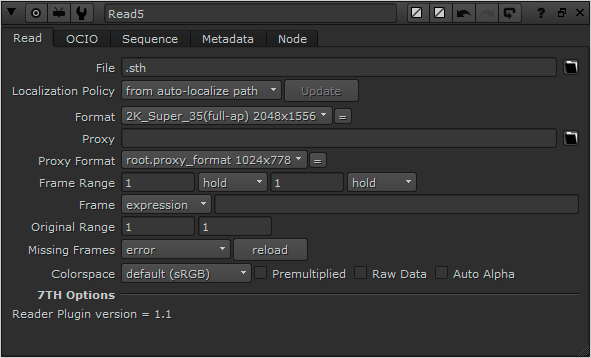
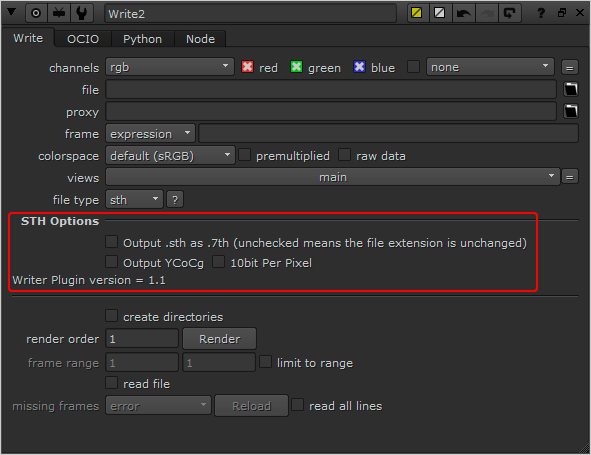
Some Nuke systems don't not recognise numeric characters in filenames, so in Nuke there exist the option for .7th frames to be imported/exported with the .sth file extension.

Once built, your plug-in binary (a shared library with the appropriate .dylib/.so/.dll extension depending on your platform) will need to be placed in a path where NUKE scans for plug-ins on startup. On all platforms this will be either your ~/.nuke (i.e. <user home directory>/.nuke/, where the dot prefix may mean it is hidden by default in your file browser), or somewhere in your NUKE_PATH which defaults to: •macOS 64-bit: /Library/Application Support/NUKE/x.x/plugins/ •Linux 64-bit: /usr/local/NUKE/x.x/plugins/ •Windows 64-bit: C:\Program Files\Common Files\NUKEx.xplugins Where <x.x> is the major.minor version of the NUKE in question. Conveniently, NUKE_PATH can be added to by setting an environment variable of the same name. This is often of use when building and testing plug-ins, because you can set an environment variable pointing at your build directory and then fire up NUKE to try it out. It is recommended when packaging up NDK plug-ins for distribution that you use the NUKE_PATH directories, and install your bundle in an appropriately named subdirectory (since the default path is searched single level recursively). There are several ways to add a plug-in to your current session. •Hit x to bring up the script command and type in the name of the plug-in and hit enter. If the plug-in is found in the various paths searched for the plug-in, an instance is added to the Node Graph. This is generally of most use when first setting up plug-ins. If this fails, you may want to try the script command ‘load <my plug-in name>’ which tests that the plug-in can be found and that dynamic loading works. The common reasons why this might not work is that the DD::Image:::Op::Description is incorrect, or that the plug-in has been built against a different version of the NDK than that supported by the version of NUKE you’re trying to load it into. •Go to the Other > All plug-ins menu and hit update, or hit tab and type update-enter. Both of these add the full list of found plug-ins to the menu (and thus tab selector), allowing them to be added by the usual means. Again, this is generally of most use when first setting up plug-ins. •You can add your own menu entry to the default toolbar by adding a menu.py file to the NUKE_PATH and following the guidelines laid out in the Python Reference Guide. This is recommended for packaging up plug-ins for distribution as it allows easy discovery of your tools. Additionally, any pre-requisite Python elements can be initialised in menu or init.py, including the usual icons and so on.
|
Import .sth or .7th frames with the Reader component.
Export .sth or .7th frames with the Write component. Selection of file extension, bit-depth/compression options. Output YCoCg (outputs .7th YCoCg compressed format) Output 10bit Per Pixel (outputs 4:2:2 10-bit).
IMPORTANT CONSIDERATION: When using the sth422Writer and sth422Reader to write your Nuke render to a .7th or .sth format, and then subsequently read it back into Nuke, you will see a change in the RGB values compared to your original in Nuke. The reason for this expected: Red, Green and Blue pixel values in Nuke as represented as 32-bit float, and when the data is saved to file, these values are converted to 8 or 10-bit. This is necessary to make them compatible with 8 or 10-bit .sth or .7th files. This process causes the original data to be approximated so the information can be encoded within the specified number of bits. When the data is then read back using the sth422Reader, it begins its conversion process at the saved approximated value. Therefore, after the reader has done its processing and fed that information back to Nuke, it will give slightly different RGB values to those originally created in Nuke. For this reason, it is recommended that content creation and changes are done on the original Nuke node and not on a node that has been read from the sth422Reader. The reader should be used primarily for checking frames, not editing.
|