Output Formats
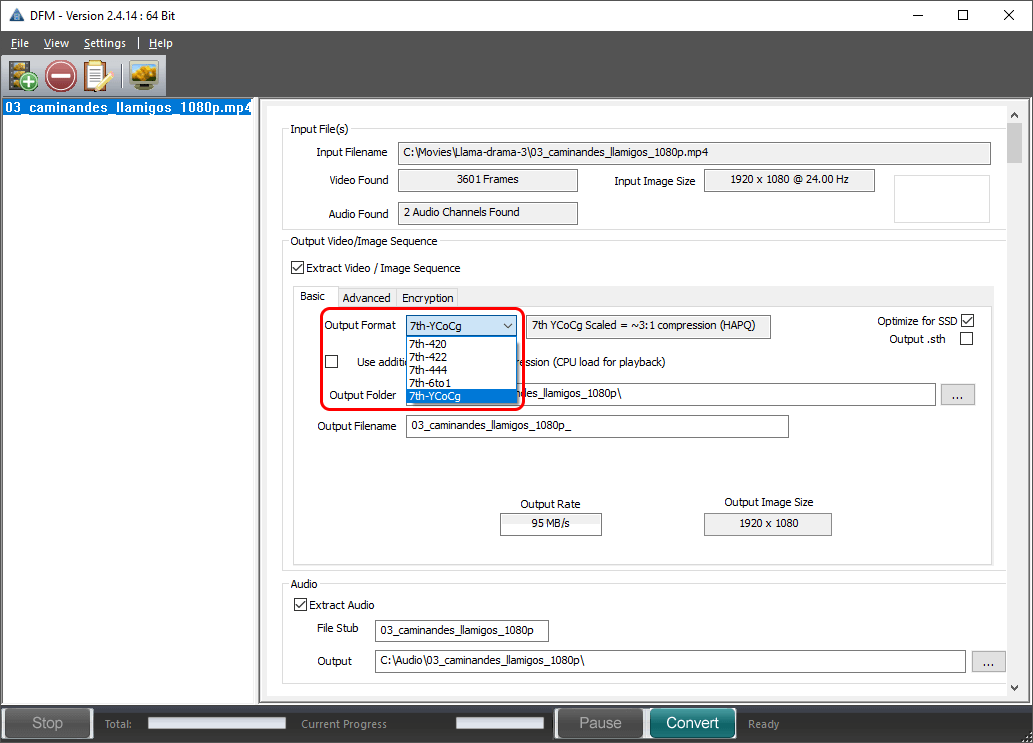
Select the required output format from the drop-down list.
Basic File Format |
Details |
|---|---|
7th-YCoCg |
3:1 Compression 7th files are a fixed file size for a specific resolution. This format is equivalent in quality to the best HapQ standard. |
7th-420 |
2:1 Compression 7th-420 formats are equivalent to MPEG2 video standard, and compress the chrominance portions of the signal in both axes These files have the best compromise between image quality and hardware requirements. |
7th-422 |
1.5:1 Compression 7th-422 formats are equivalent to broadcast video standard, and compress the chrominance portions of the signal. These files have the best compromise between image quality and hardware requirements. |
7th-444 |
1:1 (No compression) This is perfect image quality, though largest file size. |
7th-6to1 |
6:1 Compression. This is an old file type that is rarely used now, and no longer regularly tested. This is a flat filesize format, and the lowest quality and performance load among all .7th formats. |
Output File Name
The output file name is chosen based on the first file found in the folder (03_caminandes_llamigos_1080p_ in the example above). You can edit this in the Basic tab to change the base name of the output files if you prefer. We recommend you leave a trailing underline for clarity.